
DSTology vs OptiSigns: which one fits your screens?
Choose OptiSigns if you want to set everything up yourself and use players like Fire TV or Raspberry Pi. Choose DSTology if you run restaurants, cafés or shops that need Arabic, menu prices from Foodics, and a team in Ottawa or Riyadh that sets it up with you.
What you work with every day
Real screens from the DSTology app, in English or Arabic with one click.
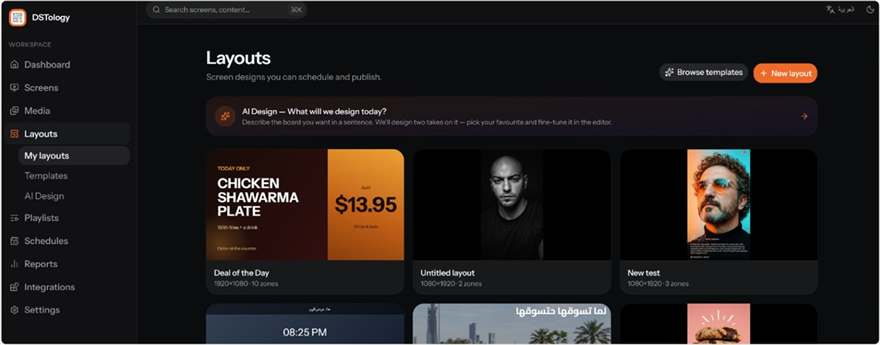
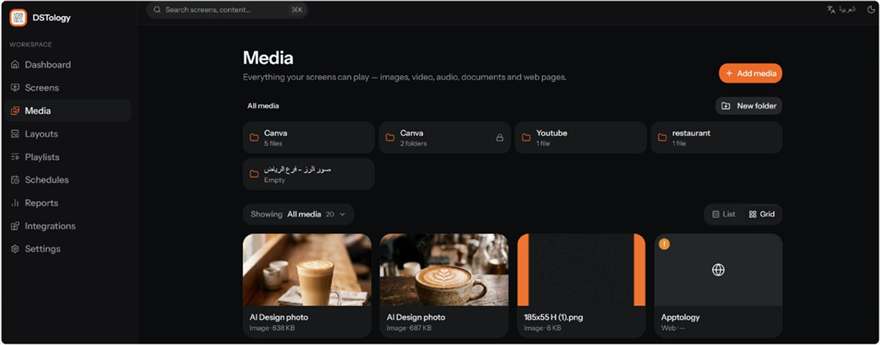
Screenshots of the DSTology web app. Menu prices shown are sample content.
The differences that matter
OptiSigns details from optisigns.com/pricing, checked October 2026. Prices in USD, monthly billing.
How they compare, point by point
Arabic and bilingual screens
DSTology was built for Arabic from the start. The dashboard runs right to left, screens show Arabic and English side by side, and you can ask the AI for a design in Arabic. OptiSigns does not say how it handles Arabic, so test it with your real menu before you commit.
Edge: DSTologyRunning screens day to day
In DSTology you type what you want, such as “lunch special on all Ottawa screens until 3pm”, and the right screens update. OptiSigns works the classic way: you build playlists and schedules, which suits teams who like full manual control.
Depends on how you workMenus that match the till
DSTology reads prices and stock from your POS (Foodics today, other systems on request), so a sold-out item dims itself and prices never disagree with the till. OptiSigns can map live data with OptiSync on its Pro Plus plan and above. With either, ask whether your exact POS is supported.
Edge: DSTology for Foodics restaurantsHardware
Both run on Samsung and LG smart TVs and Android devices, so most businesses can keep their screens. OptiSigns supports more player types, including Fire TV, Windows and Raspberry Pi. If you already own those, that counts for OptiSigns.
Edge: OptiSignsPrice
OptiSigns publishes its prices: a free plan, then $10 to $45 per screen per month, with 10% off yearly. DSTology starts free: your first screen costs nothing, and the 14-day trial covers the rest. After that the price per screen drops as you add screens. Count screens, players, setup time and who designs the content, not just the licence.
Ask us for a quote for your branchesSetup and support
OptiSigns is self-serve: you sign up and connect screens yourself, and it has thousands of reviews on Capterra. DSTology comes with the Apptology team in Ottawa and Riyadh, who walk you through it on your own screens and help build your first templates.
Edge: DSTology if you want helpAn honest recommendation
Choose DSTology if
- Your screens need Arabic, or Arabic and English together.
- Your menu prices should follow your POS, such as Foodics, automatically.
- You run several branches and want to change them all in one sentence.
- You want a local team in Canada or Saudi Arabia to set it up with you.
Choose OptiSigns if
- You want to start on a free plan and grow from there.
- You use Fire TV, Windows or Raspberry Pi players.
- You need many third-party apps, kiosks or IoT triggers.
- You prefer to set everything up yourself.
Which one fits you?
Tick what is true for your business. The meter uses the same points as our recommendation above, so it can point either way.
Tick a few points to see which fits better.
Both are solid choices. The right one depends on your screens, languages and how much help you want.
Book a free callSwitching is free
Book a switch-over call and our team does the setup with you. Your images and videos upload again in minutes, and you can describe your old schedules in plain language to rebuild them faster.
Book a free call
Pick a time that suits you. We look at your screens and what they show today.
Pair your screens
Each screen pairs in under a minute. Samsung, LG and Android TVs usually stay where they are.
Rebuild your first menu
We rebuild your first menu and schedule with you, so you are live before the call ends.
DSTology vs OptiSigns: common questions
Is DSTology cheaper than OptiSigns?
Your first screen is free and there is a 14-day trial. After that DSTology quotes by screen count and the price per screen falls as you add screens, so compare a quote for your branches with OptiSigns’ $10 to $45 per screen.
Does DSTology work with Foodics?
Yes. Menu prices and sold-out items can come straight from Foodics. Other POS systems are connected on request.
Does DSTology work with my Samsung or LG TV?
Yes. It runs on Samsung and LG smart TVs, Android TV boxes and any screen with a browser.
Does OptiSigns support Arabic?
OptiSigns does not state Arabic support on its site. Test it with your own Arabic content.
Can I keep my screens if I switch?
Usually yes. Both run on Samsung, LG and Android screens, and the switch-over call is free: we pair your screens and rebuild your first menu with you.
New to DSTology? See how it works.
See DSTology on your own screens
First screen free, a 14-day trial, and a free switch-over call.