
DSTology vs Samsung VXT: which one fits your screens?
Choose Samsung VXT if most of your screens are Samsung commercial displays and you want Samsung’s own remote management. Choose DSTology if you run restaurants, cafés or shops on ordinary smart TVs, need Arabic or Foodics menus, and want a team in Ottawa or Riyadh to set it up with you.
The differences that matter
VXT details from vxt.samsung.com/pricing, the Link My POS page and Samsung’s March 2025 VXT release, checked October 15, 2026.
What you work with every day
Real screens from the DSTology web app. Switch the whole app to Arabic with one click.
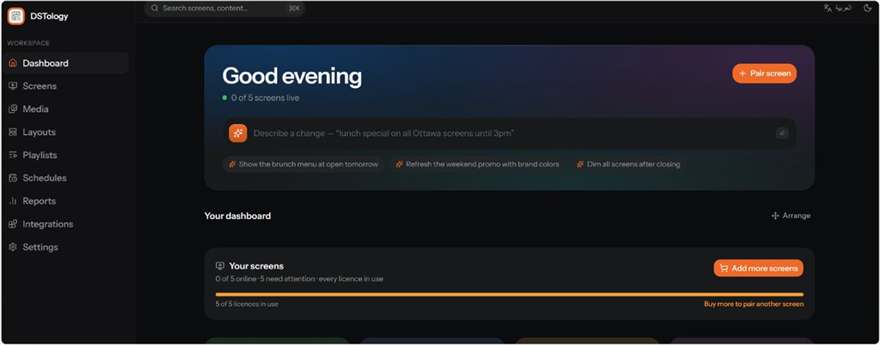
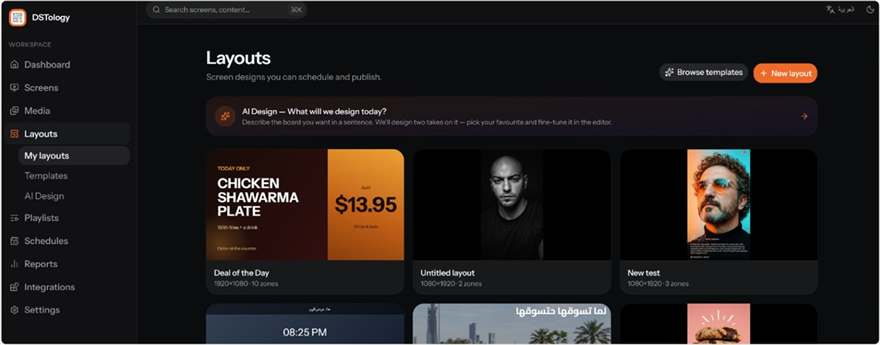
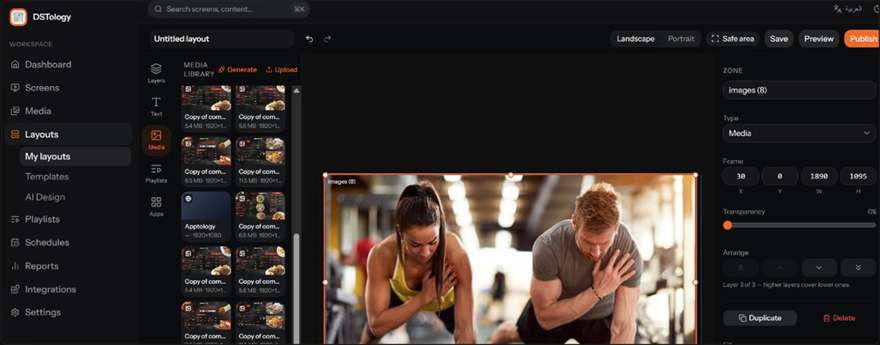
Screenshots of the DSTology web app. Menu items shown are sample content.
How they compare, point by point
The screens you already have
Samsung lists VXT for its commercial displays, ProTV business TVs, LED and e-paper signage, plus Android 10+, Windows 11 and BrightSign 9 players. Ordinary home smart TVs are not on that list. DSTology runs on Samsung and LG smart TVs, Android TV and any browser, which is what many restaurants and shops already have on the wall.
Depends on your screensMenus that match the till
VXT reads POS data through Link My POS, an add-on you buy separately, for Square, Clover, Toast, Revel or a CSV file. Foodics is not on that list. DSTology reads prices and sold-out items from Foodics today, and our app team connects other POS systems on request.
Edge: DSTology for Foodics restaurantsControl of the hardware
This is where VXT is strongest. Its remote management plans turn Samsung screens on and off, show a live view, warn you early about faults and manage energy use. DSTology shows which screens are online and what each one is playing; for hardware-level control of Samsung commercial displays, VXT goes further.
Edge: Samsung VXTArabic and bilingual screens
DSTology was built for Arabic: the dashboard runs right to left, screens show Arabic and English side by side, and you can ask the AI for a design in Arabic. Samsung’s VXT pages do not state Arabic support, so test it with your own Arabic menu before you commit.
Edge: DSTologyPrice and free trial
Neither publishes prices. VXT offers a 60-day free trial on its S Series and sells apps such as Link My POS separately. DSTology gives you the first screen free and a 14-day trial, and the price per screen drops as you add screens. Compare full quotes, including add-ons, hardware and setup time.
Edge: VXT on trial lengthSetup and support
You can start VXT yourself online or buy it through a Samsung reseller, with 24/7 phone and live chat on the X Series. DSTology comes with the Apptology team in Ottawa and Riyadh, who pair your screens and build your first menus with you, free.
Edge: DSTology if you want hands-on helpAn honest recommendation
Choose DSTology if
- You run restaurants, cafés or shops on ordinary smart TVs or Android TV boxes.
- Your menu prices should follow Foodics, or another POS that VXT does not list.
- Your screens need Arabic, or Arabic and English together.
- You want a local team in Canada or Saudi Arabia to set it up with you, free.
Choose Samsung VXT if
- Most of your screens are Samsung commercial displays.
- You need remote power control, early warning or energy management.
- Your IT team requires ISO 27001 and ISO 27701 certified software.
- You are moving a large MagicINFO network and want Samsung’s own migration tool.
Which one fits you?
Tick what is true for your business. The meter uses the same points as our recommendation above, so it can point either way.
Tick a few points to see which fits better.
Both are cloud platforms. The right one depends on your screens, your POS and how much help you want.
Book a free callThree Samsung dates to plan around
Samsung recommends VXT as the next step, and you can also move to another platform. Tap a date to see what changes.
Dates from Samsung’s notice “MIO & MIC CTN Roadmap” on docs.samsungvx.com, checked October 12, 2026.
Switching is free
We pair your screens, move your images and videos, and rebuild your schedules with you, with no limit on screens. How the free switch works.
Send us your screen models
We check your Samsung, LG or Android screens and suggest the simplest setup for each.
Pair your screens
Each screen pairs in under a minute. Screens with HDMI can use a small Android TV box.
Rebuild your content
We rebuild your first layouts and schedules with you, so you are live before the call ends.
DSTology vs Samsung VXT: common questions
Is DSTology an alternative to Samsung VXT?
Yes. Both are cloud digital signage platforms. VXT is made for Samsung commercial displays and Samsung's own remote management. DSTology runs on Samsung and LG smart TVs, Android TV and any web browser, adds Arabic and Foodics menus, and comes with a team that sets it up with you.
How much does Samsung VXT cost?
Samsung does not publish VXT prices. Each plan (S, P and X Series, plus the remote management plans) says "Contact us", with monthly or annual billing, and apps such as Link My POS are bought separately. The S Series has a 60-day free trial.
Can Samsung VXT show menu prices from Foodics?
Samsung's Link My POS add-on lists Square, Clover, CSV, Revel and Toast. Foodics is not on that list, so ask Samsung or a reseller how it would work with your menu. DSTology reads prices and sold-out items from Foodics today.
Does DSTology work on Samsung screens?
DSTology runs on Samsung and LG smart TVs, Android TV and any web browser. For Samsung commercial displays, send us the model number and we test it with you on a call. Any screen with HDMI can also run DSTology through a small Android TV box.
Does Samsung VXT support Arabic?
Samsung's VXT pages do not state Arabic support, so test it with your own Arabic menu on your own screen before you commit. DSTology has a right-to-left dashboard and screens, and Arabic and English can run side by side.
I use MagicINFO. Do I have to move to VXT?
No. Samsung stops selling MagicINFO On-Premise on December 31, 2026, ends MagicINFO Cloud on February 28, 2027 and ends support on December 31, 2029. VXT is Samsung's recommended path, but you can also move to another platform. Switching to DSTology is free.
Also compare DSTology vs OptiSigns, see all DSTology comparisons, or see how DSTology works.
See DSTology on your own screens
First screen free, a 14-day trial, and a free switch-over from VXT, MagicINFO or any other system.