Key takeaways
- A printed menu suits a fixed menu that rarely changes, but every price or item change means reprinting.
- A USB screen is a middle ground for one screen, but every update means a new file copied to each screen.
- Cloud menu screens suit restaurants that change the menu often or have several branches: one edit reaches every branch within minutes.
- The SFDA menu rules (calories, caffeine and the salt icon) apply to all three.
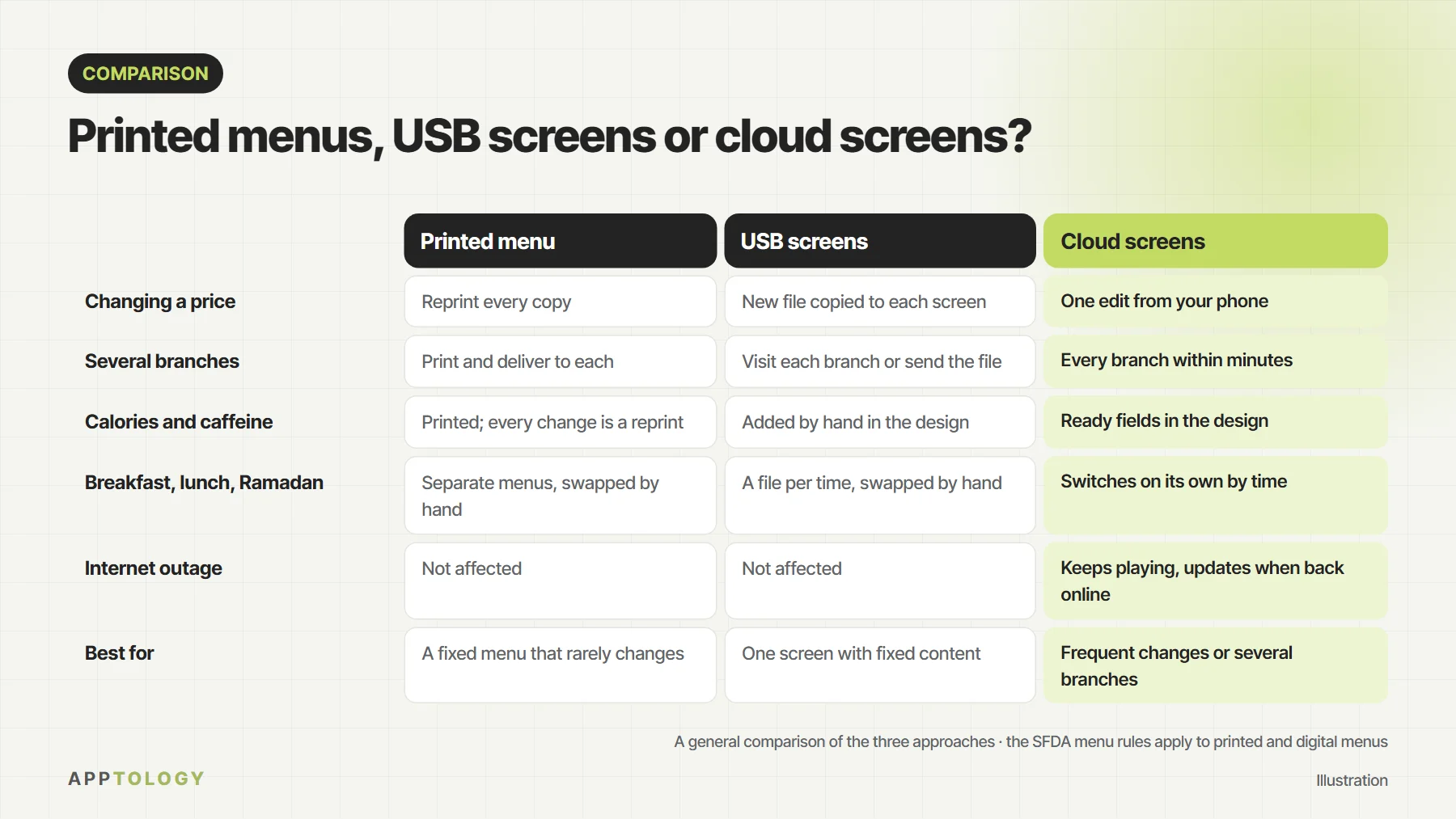
The short answer: if your menu is fixed and prices rarely change, a printed menu is enough. If you have one screen showing content that doesn’t change, a USB screen does the job. If you change prices and offers often, have more than one branch, or want menus that switch on their own between breakfast, lunch and dinner and in Ramadan, cloud menu screens save time and keep the menu right in every branch.
How the three options compare
| Printed menu | USB screens | Cloud screens | |
|---|---|---|---|
| Changing a price | Reprint every copy | New file copied to each screen | One edit from your phone |
| Several branches | Print and deliver to each | Visit each branch or send the file | Every branch within minutes |
| Calories and caffeine | Printed; every change is a reprint | Added by hand in the design | Ready fields in the design |
| Breakfast, lunch, Ramadan | Separate menus, swapped by hand | A file per time, swapped by hand | Switches on its own by time |
| Internet outage | Not affected | Not affected | Keeps playing, updates when back online |
| Best for | A fixed menu that rarely changes | One screen with fixed content | Frequent changes or several branches |
What happens when you change one price?
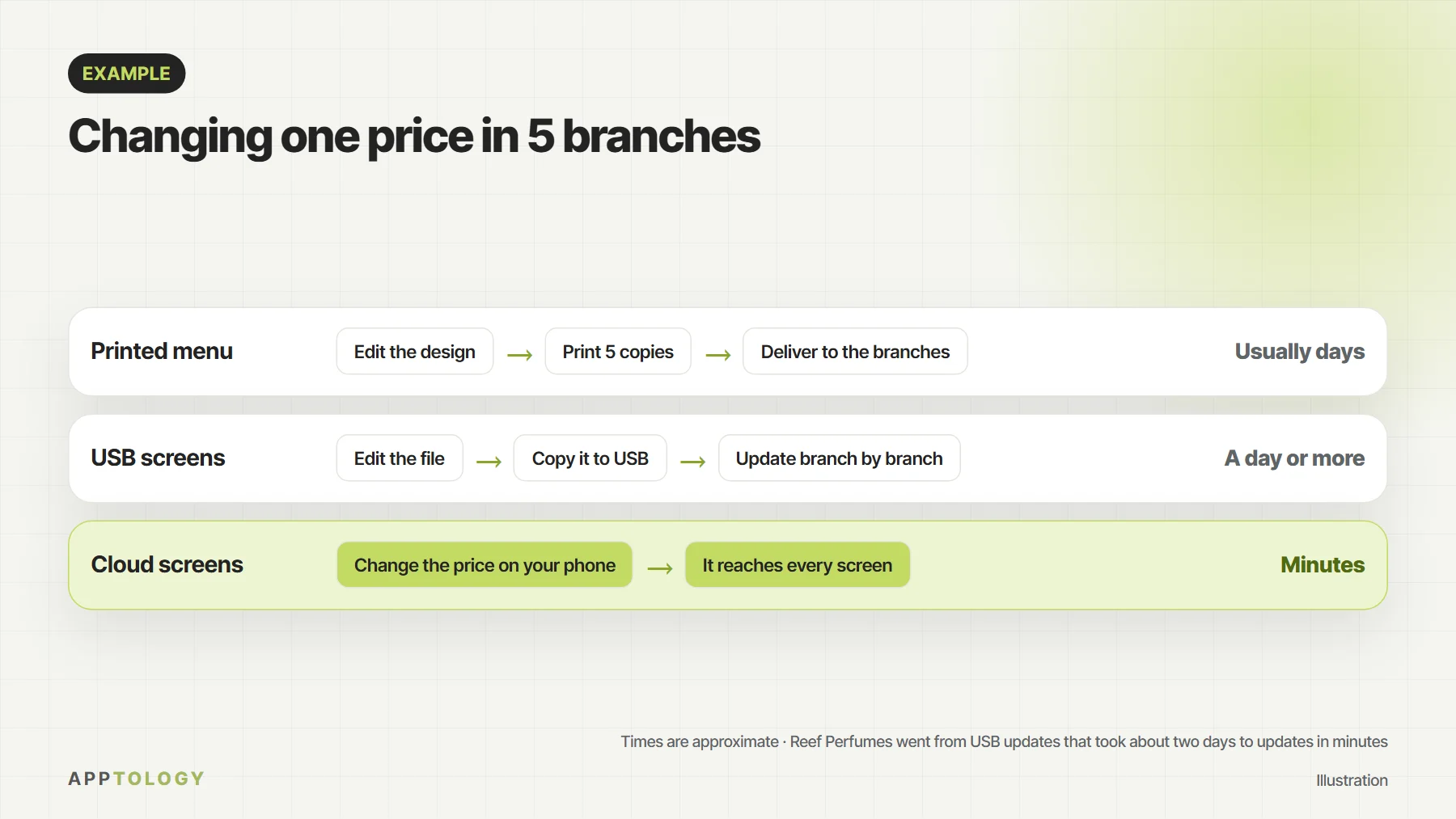
With printed menus you edit the design, print a copy for each branch, then deliver and fit them, which usually takes days. With USB screens you edit the file, copy it, and update each screen in each branch. With cloud screens you change the price once on your phone and it reaches every screen within minutes. Reef Perfumes, for example, went from USB updates that took about two days to updates in minutes.
The SFDA rules apply to all three
The Saudi Food and Drug Authority requires calories for every item on restaurant and café menus and, since 1 July 2025, also caffeine for drinks, a salt icon on high-salt items and the activity needed to burn the calories. The rules apply to printed and digital menus, delivery apps and QR menus. The difference is that every change to a printed menu means a reprint, while screens update this information from one place. For the full rules, see how to open a restaurant in Saudi Arabia.
When is a printed menu enough?
- A short menu whose prices change once or twice a year.
- One branch with no seasonal offers or time-of-day menus.
- A spot where a screen doesn’t fit, such as the tables.
When will a USB screen do?
- One screen showing fixed content, such as photos of dishes.
- No need to change content by time of day.
- Someone on site who can update the screen by hand when needed.
When do you need cloud menu screens?
- You change prices or offers every month or more often.
- You have more than one branch, or plan to open another.
- You want breakfast, lunch and dinner menus, and iftar and suhoor in Ramadan, to switch on their own.
- You use a POS such as Foodics and want prices and sold-out items kept up to date on the screens.
- You have a drive-thru or a shopfront screen that must be readable in daylight.
Cost: what to compare
With printed menus you pay for every print run, again with every change. With USB screens you pay for the screen once, but your team’s time comes back with every update in every branch. With cloud screens you pay for the screen and a management subscription, and updates become free and fast. With DSTology your first screen is free for good, with a 14-day trial for more screens.
How to move from printed menus or USB to cloud screens
- Use the smart TVs you have (Samsung, LG or Android TV) or any screen with a browser. See regular TV vs commercial display.
- Pair each screen with the app in under a minute.
- Design the menu in Arabic or English with AI, including calories, caffeine and the salt icon.
- Set the breakfast, lunch, dinner and Ramadan schedule once.
- If you are on another system, the switch-over is free.
Try cloud menu screens in your branch
Your first screen is free for good, with a 14-day trial for more screens and on-site setup in Riyadh, Jeddah, Dammam and Khobar.
Before you decide
Questions
Is a digital menu better than a printed menu?
It depends on your restaurant. If the menu is fixed and rarely changes, printed is enough. If you change prices or offers often or have several branches, a digital menu on cloud screens saves printing and time and keeps every branch on the same menu.
Do digital menu screens need to show calories?
Yes. The SFDA rules apply to printed and digital menus alike: calories for every item and, since 1 July 2025, also caffeine, the salt icon and the activity needed to burn the calories.
Do cloud menu screens need internet all the time?
Only to receive updates. If the connection drops, screens keep playing and schedules keep running, then they update as soon as it is back.
Can I use a regular TV instead of a commercial display?
Usually yes. DSTology runs on Samsung and LG smart TVs, Android TV and any screen with a browser. For shopfronts and sunny spots, a high-brightness display is better.
What is the difference between a USB screen and a cloud screen?
A USB screen plays a file you load onto it yourself, so every update needs someone at the screen. A cloud screen receives changes from the app, so a change reaches every screen in every branch within minutes.
Read next: 12 questions to ask before you choose digital signage, digital menu boards for restaurants and how to open a restaurant in Saudi Arabia.