Key takeaways
- Most counters need 2 to 4 screens; a small café can start with one.
- For customers 3 to 5 metres away, 50 to 55 inch screens are a common choice, with item names at least 2.5 cm tall for every 3 metres.
- Indoors a normal screen is bright enough. Facing a glass front you need a high-brightness display, and outdoors or at a drive-thru one built for sun and heat.
- Use the same screen model across a row, and run every screen from one app so one edit updates them all.
The short answer: start with your menu sections. One screen per section (breakfast, mains, drinks, offers) is a good start, which is why most restaurants end up with 2 to 4 screens side by side. Then pick the size from how far customers stand: 43 inch up to about 3 metres, 50 to 55 inch from 3 to 5 metres, and 65 inch or larger beyond that or under a high ceiling. Then match brightness to the light: a normal screen indoors, a high-brightness one facing windows, and an outdoor display at a drive-thru.
What you need for a digital menu board
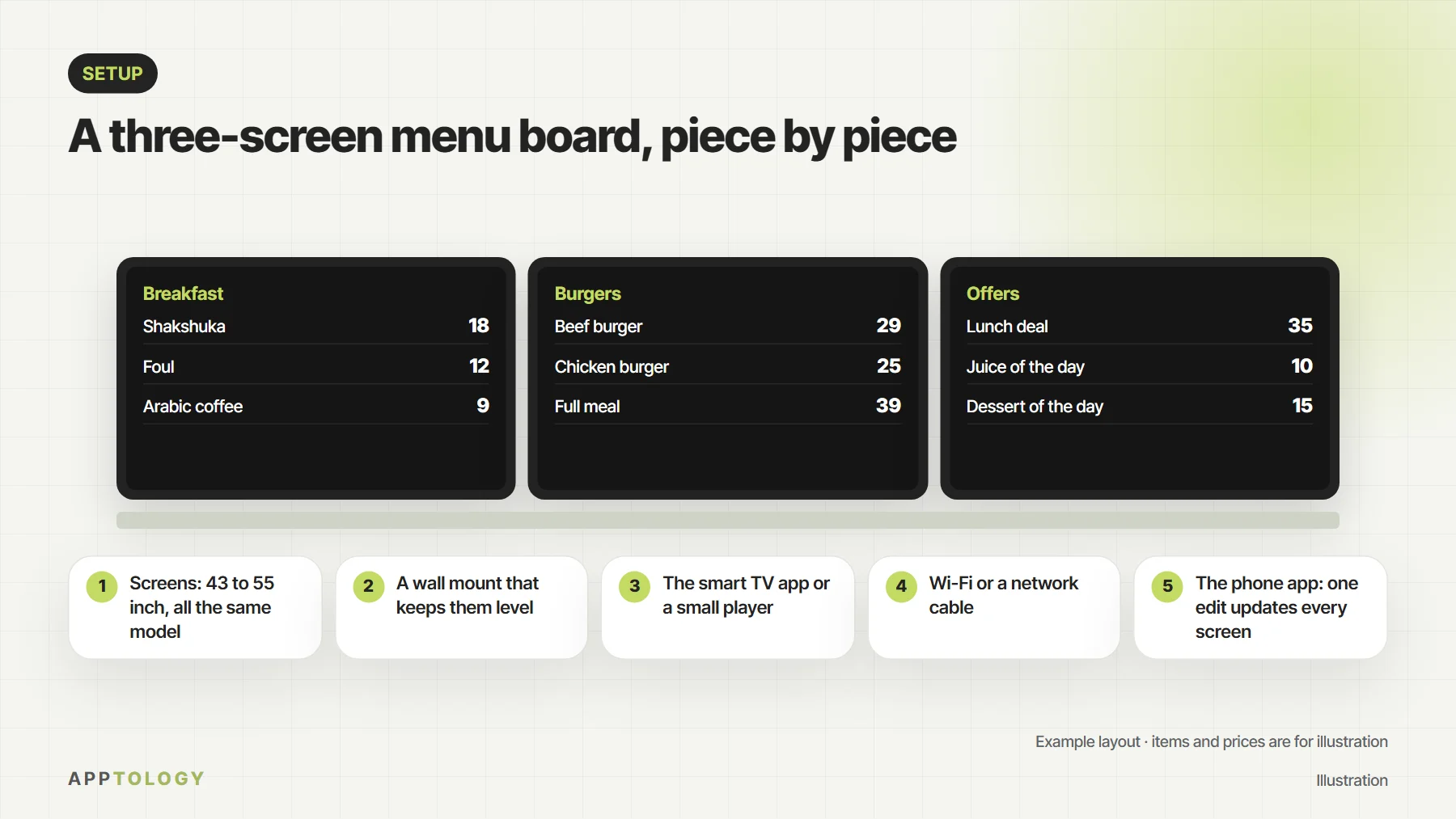
A digital menu board is five things: the screens, a mount that keeps them level, something to play the menu (the app on a smart TV, or a small player), an internet connection, and the software you edit the menu in. DSTology runs on Samsung and LG smart TVs, Android TV and any screen with a browser, so a smart TV doesn’t need an extra box. You pair each screen with the app in under a minute, and if the internet drops the screens keep playing.
How many screens do you need?
| Your counter | Screens | Typical layout |
|---|---|---|
| Café or kiosk with a short menu | 1 to 2 | Drinks on one screen, food or offers on the other |
| Quick-service counter | 3 | Main menu in the middle, combos and offers on the sides |
| Large menu or several meal times | 4 or more | One screen per section, plus one for offers |
| Drive-thru | 1 to 2 outside | An offers screen before the order point, and the menu at the order point |
These are starting points, not rules. Count your menu sections and best sellers, and give each its own screen rather than shrinking the text to fit everything on one.
What size screen for a menu board?
Screen size helper
Suggested screen: 43 inch. Item names at least 2.5 cm tall.
| How far customers stand | Common screen size | Item names |
|---|---|---|
| Up to 3 m | 43 inch | At least 2.5 cm tall |
| 3 to 5 m | 50 to 55 inch | 2.5 to 4 cm tall |
| More than 5 m, or a high ceiling | 65 inch or larger | 4 cm or more |
A common rule of thumb for signs: letters about 2.5 cm tall read comfortably from 3 metres. Use it for item names and prices, and keep descriptions short. A bigger screen with fewer items reads better than a crowded one.
Landscape or portrait?
- Landscape (wide) suits a classic menu with several columns of items and prices.
- Portrait (tall) suits one section per screen, a meal with a large photo, or a narrow wall.
- Use one direction for every screen in a row so the board looks like one piece.
How bright does the screen need to be?
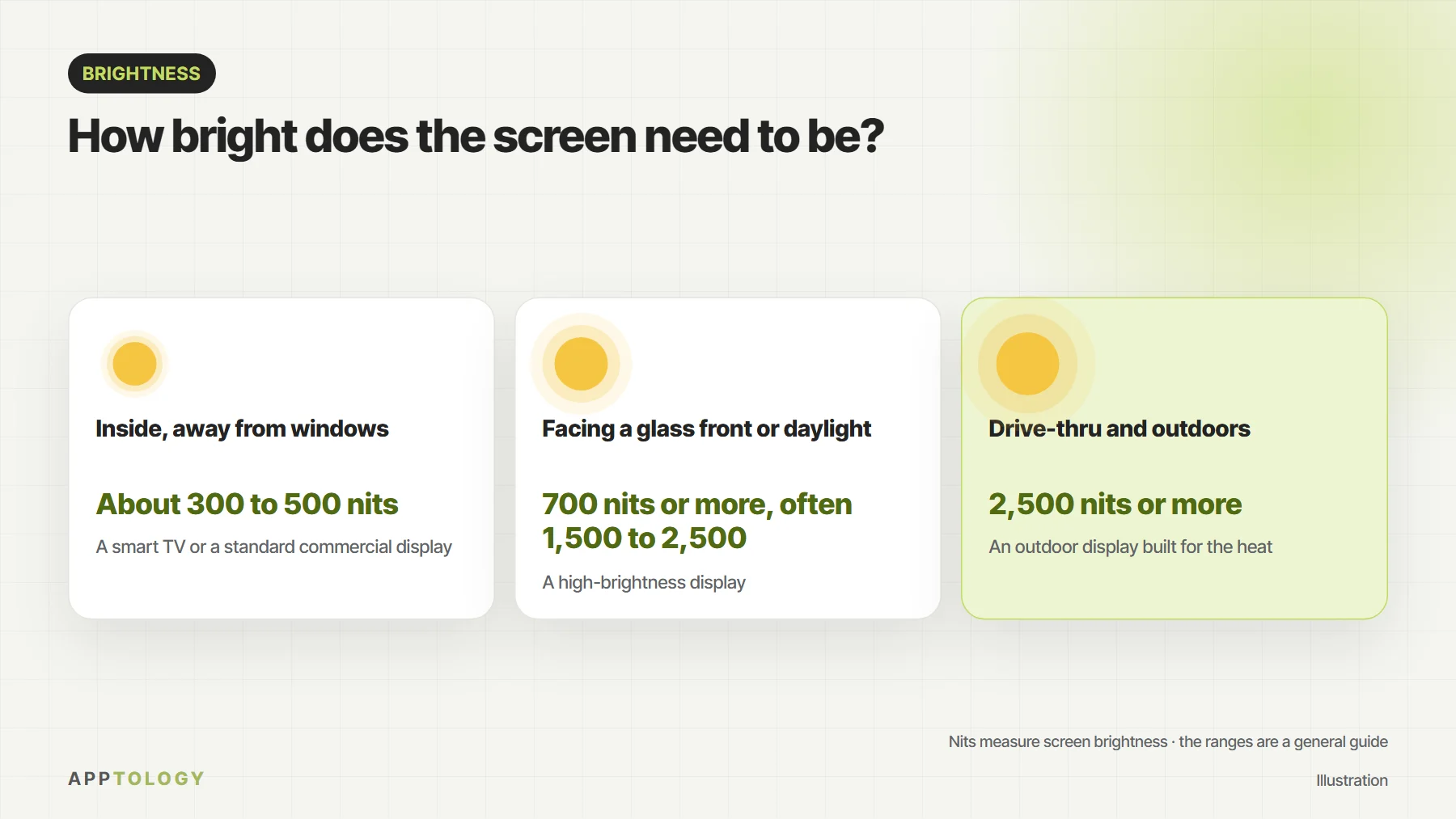
Screen brightness is measured in nits. Inside a restaurant, away from windows, a smart TV or standard commercial display (about 300 to 500 nits) is enough. A screen facing a glass front or strong daylight needs a high-brightness display, 700 nits or more and often 1,500 to 2,500. Outdoors and at a drive-thru, use an outdoor display of 2,500 nits or more that is built for direct sun and summer heat.
Backlit lightbox or digital screen?
A backlit lightbox lights a printed menu panel from behind. It is simple and bright, but every price or item change means printing and fitting a new panel. A digital screen is lit too, and the menu on it changes from your phone, switches by time of day, and shows the calories, caffeine and salt icon the SFDA requires. For the full comparison, see printed menus vs USB screens vs cloud menu boards.
Multi-screen menu displays: several screens as one menu
- Use the same model and size for every screen in a row, so colours and brightness match.
- Mount them level with even gaps; thin-bezel commercial displays make the gaps smaller.
- Give each screen its own part of the menu instead of repeating the same content.
- Run every screen from one app, so a price change or a new offer reaches every screen in every branch at once.
- Let the menus switch on their own: breakfast, lunch and dinner, and iftar and suhoor in Ramadan.
Smart TV or commercial display?
A smart TV is often fine to start with, especially indoors and for a few hours a day. For long opening hours, a glass front or a busy counter, a commercial display is built for long daily use and higher brightness. We explain the difference in regular TV vs commercial display. With DSTology you can start with the TVs you have, and we also supply and install commercial and high-brightness displays with our partners.
Who installs menu board screens in Saudi Arabia?
Our team in Riyadh sets up screens on site in Riyadh, Jeddah and Dammam and Khobar: we install the screens, pair them with DSTology and set up your menu in Arabic and English, with Foodics prices and sold-out items if you use Foodics. Your first screen is free for good, with a 14-day trial for more screens, and switching from any other system is free. For what the screens themselves cost, see how much digital menu boards cost.
Menu screens you run from your phone
From one screen to every branch, in Arabic and English, with menus that switch on their own. Your first screen is free for good.
Before you buy screens
Questions
How many screens do I need for a digital menu board?
Most counters use 2 to 4 screens side by side: one for each menu section and one for offers. A small café or kiosk can start with one or two.
What size screen is best for a menu board?
It depends on how far customers stand. As a guide: 43 inch up to about 3 metres, 50 to 55 inch from 3 to 5 metres, and 65 inch or larger beyond that. Item names should be at least 2.5 cm tall for every 3 metres of distance.
How bright should a menu board screen be?
Indoors, away from windows, a normal screen of about 300 to 500 nits is enough. Facing a glass front or daylight, use a high-brightness display of 700 nits or more, often 1,500 to 2,500. Outdoors and at drive-thrus, use an outdoor display of 2,500 nits or more built for the heat.
Can several screens work as one menu?
Yes. Use the same screen model across the row, mount them level, and give each screen its own part of the menu. With DSTology every screen runs from one app, so one change reaches every screen in every branch.
Do I need a separate media player for each screen?
Not with a smart TV. DSTology runs on Samsung and LG smart TVs, Android TV and any screen with a browser. For a screen without these, a small Android TV box can be added.
Who installs digital menu boards in Riyadh?
Apptology, the company behind DSTology, has a team in Riyadh that sets up screens on site in Riyadh, Jeddah, Dammam and Khobar. Message us on WhatsApp at +966 55 446 9093.
Read next: digital menu boards for restaurants, 12 questions to ask before you choose digital signage and how much digital menu boards cost.